Low Screening Efficiency? Check These Vibrating Screen Operating Variables
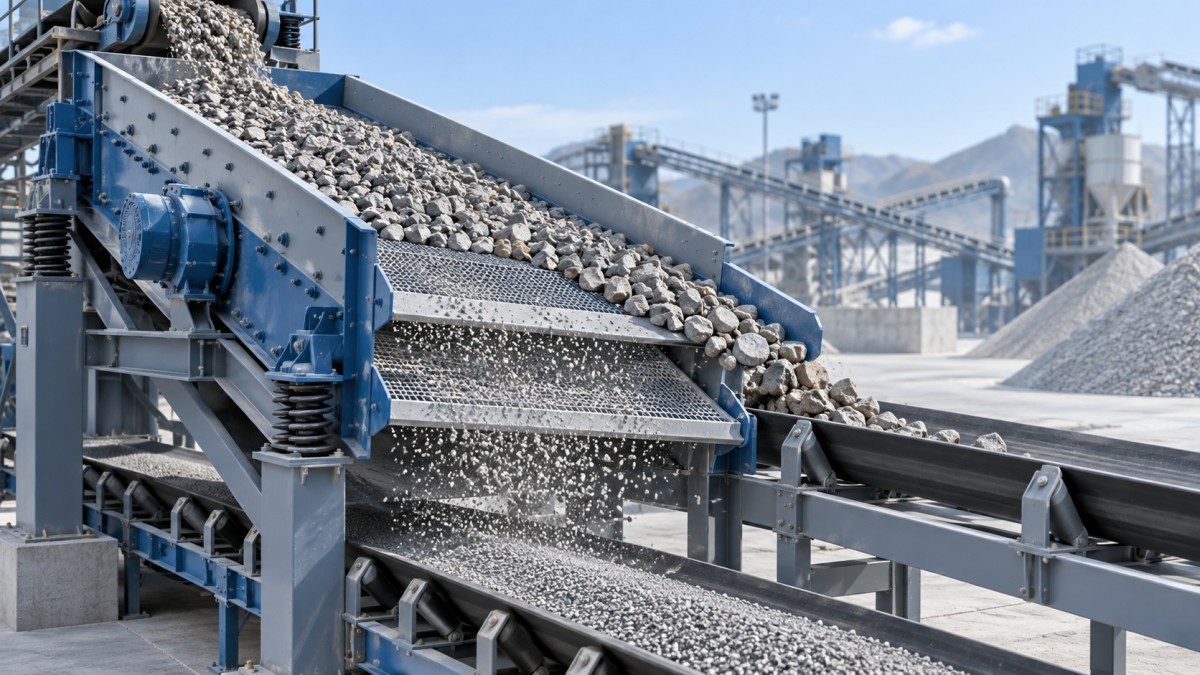
A screen line can appear busy while producing less usable material than expected: the deck is covered, the conveyor is running, and yet oversize carries into the product stream or good material is lost with the reject. Low screening efficiency is rarely solved by increasing speed alone. The fastest way to recover performance is to check the operating variables that control how material spreads, stratifies, contacts the openings, and exits the deck.
Start with the feed condition and work outward. On a Vibrating Screen, feed rate, material moisture, vibration settings, deck angle, screen media condition, and discharge behavior interact with one another. Changing several settings at once makes diagnosis difficult. A controlled adjustment sequence helps operators identify the real restriction without creating a new problem elsewhere in the circuit.
First, confirm what “low efficiency” looks like
Efficiency problems do not always have the same symptom. A screen that is overloaded may show a thick moving bed and poor separation across the entire deck. A blinded mesh may pass material unevenly, with fine particles building up in selected zones. Incorrect vibration can cause material to bounce excessively, reducing contact time with the apertures. Before adjusting the machine, inspect both the retained material and the passing stream.
- Too much near-size material in the oversize discharge: particles close to the opening size are not getting enough opportunities to pass.
- Oversize contamination in the undersize product: damaged or loose screen media, incorrect deck arrangement, or bypassing around the edges may be involved.
- Material piles near the feed end: feed rate, feed distribution, or deck inclination may be limiting travel.
- Fine material accumulates on top of coarse particles: stratification is weak, often because the bed is too deep, too wet, or moving incorrectly.
- Only part of the screen surface is doing the work: the incoming material is not spread evenly across the deck width.
These observations provide a better starting point than relying only on production tonnage. A high feed rate can make the machine look productive while reducing the quality of separation and increasing recirculating load.
Feed rate and bed depth come before machine adjustments
Excessive feed rate is one of the most common reasons for poor screening. Each particle needs access to the screen surface. When the bed is too deep, fine and near-size particles remain trapped beneath larger pieces, while material moves toward discharge before it has enough chances to pass. The result is usually low separation efficiency rather than an immediate stoppage.
Reduce the feed gradually and observe the material bed along the deck. The goal is not an empty screen; a light, stable layer is needed for effective stratification. The useful condition is one where material covers the width reasonably evenly, moves forward without surging, and exposes fines to the openings throughout the screening length.
Feed distribution matters as much as total volume. Material delivered in a narrow center stream leaves the outer portions of the deck underused. Material thrown heavily against one side can overload that section and accelerate wear. Check feeder alignment, chute geometry, drop height, and any distributor plate. A properly adjusted feeder should present a controlled layer rather than a concentrated pile.
Moisture, clay, and particle shape can change the screen’s behavior
Dry, free-flowing crushed stone behaves very differently from wet sand, sticky fines, weathered ore, or material containing clay. Moisture can make particles adhere to one another and to the mesh, reducing the open area available for screening. Flat or elongated particles may lie across openings even when their nominal size suggests they should pass. Near-size material is especially sensitive to these conditions.
When screening becomes unstable after rain, washing, or a change in source material, do not assume the screen has a mechanical fault. Inspect the media for pegging and blinding. Pegging occurs when particles wedge in the openings; blinding occurs when damp fine material forms a coating or plugs the apertures. Both reduce effective open area, but the remedy may differ. Pegged apertures may require a more suitable opening shape or self-cleaning media. Blinding may require better drainage upstream, a modified spray arrangement, or a different screen media material.
For wet-process circuits, dewatering performance should also be viewed as part of the screening problem. Excess water carried into downstream equipment can alter bed behavior and raise the risk of blinding. Where the process requires dedicated separation of water from washed material, equipment such as the FEIFAN OEM TSS Series Industrial Vibrating Dewatering Machine for Ore Washing Plant may be considered as a separate process step, provided its capacity and discharge characteristics match the line.
Check the actual motion, not only the setting on paper
Vibration amplitude, operating frequency, direction of throw, and motor rotation determine how material moves over the deck. A setting that worked for one gradation may not work for another. Higher vibration does not automatically produce better screening. Excessive acceleration can cause particles to hop too far above the surface, limiting their contact with apertures. Insufficient motion may leave the bed sluggish and prevent effective stratification.
Observe the material rather than adjusting by assumption. A healthy flow usually shows repeated short advances with enough agitation for smaller particles to work downward. Long jumps, violent scattering, or a bed that appears to slide as a solid layer can indicate unsuitable motion. Inspect springs, motor synchronization, drive belts where applicable, and structural fasteners before changing operating settings. Worn springs or uneven support conditions can alter machine movement and create uneven loading across the deck.
Any adjustment should follow the equipment manufacturer’s permitted range. Changing counterweights, stroke, or rotational configuration without confirming the intended design can increase stress on bearings, side plates, and screen media. Record the original settings before adjustment so that the process can be returned to a known baseline.
Deck angle affects both residence time and capacity
Inclination determines how quickly material travels toward discharge. A steeper deck often increases conveying speed and may help prevent buildup, but it also shortens residence time. That can reduce the opportunity for near-size particles to pass. A flatter deck increases retention time but can lower throughput or create material accumulation when feed is heavy or damp.
The best angle is therefore linked to the material and the required cut size. Coarse scalping applications can tolerate faster travel than fine separation duties. When low efficiency is concentrated in the near-size fraction, a slightly slower material advance may help, but only after confirming that the feed is not already too deep and the screen media is open.
Screen media condition is often the hidden restriction
A screen deck can look intact from a distance while losing efficiency through worn, stretched, blocked, or incorrectly installed panels. As openings wear larger, oversize contamination may increase. As polyurethane or wire mesh becomes damaged, the material flow can become uneven. Loose panels allow material to bypass around the edges, producing poor separation even though most of the deck appears serviceable.
During shutdown, inspect the complete screening surface, including panel joints, tensioning points, side sealing, support rails, and areas below the feed box. Look for polished wear zones, torn wire, cracked media, plugged apertures, and missing fastening components. Pay attention to the first section beneath the feed point, where impact and abrasion are often greatest. A localized problem there can affect the entire deck because material reaches the remaining surface already poorly distributed.
Opening selection should match the required cut, not just the nominal product size. The needed aperture can vary with particle shape, moisture, desired separation accuracy, and whether the material is screened dry or wet. Replacing worn media with the same specification may not solve a recurring issue if the original opening type is unsuitable for the feed.
A practical adjustment order prevents wasted downtime
When output quality declines, use a sequence that separates process issues from mechanical issues. Begin with a short period of observation while the screen is under normal load. Note where material enters, how it spreads, whether it stratifies, and where it leaves the deck. Then make only one controlled change at a time.
- Check feed consistency, feeder operation, and whether the bed is too deep.
- Inspect for moisture-related blinding, pegging, clay buildup, or poor drainage.
- Confirm that material is distributed across the full deck width.
- Examine screen media, seals, support rails, and fasteners during a safe shutdown.
- Verify vibration behavior, spring condition, and drive synchronization against the equipment requirements.
- Review deck angle and residence time only after feed and media conditions are understood.
This order avoids a frequent mistake: increasing vibration to compensate for an overloaded or blinded deck. That response may make the screen appear more active while worsening media wear, product contamination, or structural loading. When the operating variables are stable, the Vibrating Screen can separate material more consistently, and changes in feed quality become easier to recognize before they affect the entire production line.
Leave A Message
If you are interested in our products and want to know more details, please leave a message here, we will reply you as soon as we can.